Merge GoPro videos the camera split into chapters
Drop every file of a long GoPro recording and Shycut puts the chapters in order and joins them into one continuous video. The join copies the footage as it is, so it is quick and loses nothing, and it all happens on your own device.
Drop your video here
Choose your videoMP4, MOV, WebM or MKV. It opens right here, on your device.
- Nothing uploaded
- No sign-up
- No watermark
How it works
Drop all the chapters
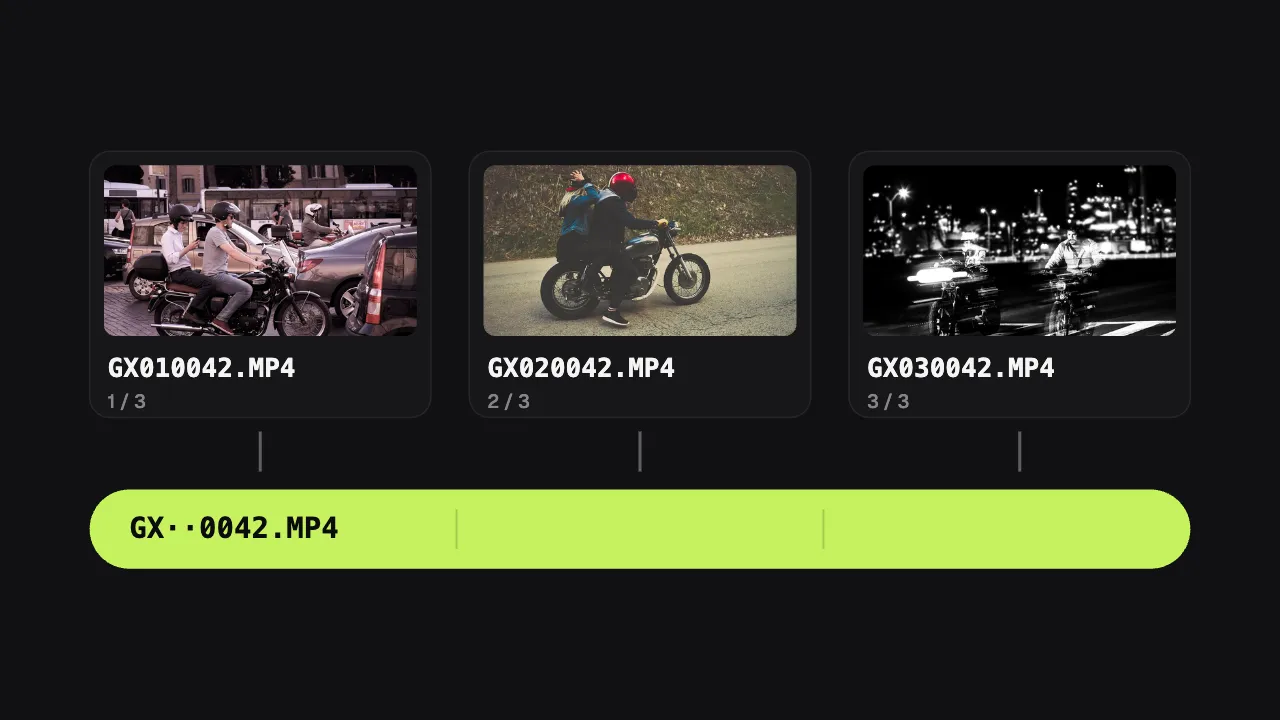
Select every file of the recording, for example GX010042.MP4, GX020042.MP4 and GX030042.MP4, and drop them in together.
Chapters are joined
Shycut reads the names, puts the chapters in order and joins them without re-encoding, so it is quick and no quality is lost.
Edit or export
Carry on with the joined video: hide plates, reduce wind, add the speed gauge, then save a new MP4.
What you get
- GoPro names understood
- Both the current GH and GX names and the older GOPR and GP names. Shycut knows which files belong together and in what order.
- A lossless join
- Picture and sound are copied as they are, not re-encoded, so joining is fast and costs no quality.
- Several recordings at once
- Drop the chapters of a whole day. Each recording is joined on its own; the first opens and the rest wait in the Media list.
- GPS stays in step
- The camera’s GPS data is read from every chapter and lined up with the joined video, so the speed gauge runs across the whole ride.
- Nothing uploaded
- Chapter files of several gigabytes never leave your device. No upload to wait for, and no file size limit set by a server.
- Originals untouched
- Shycut never changes your chapter files. What you export is always a new MP4.
When you need to join GoPro files
Long rides and road trips
A ride longer than one chapter arrives as several files. Join them first, then cut the highlights from one continuous video.
Track days and trail runs
Keep a full session in one piece, so every lap or the whole descent can be watched from start to finish.
Walks, hikes and city tours
Long recordings on a chest or head mount become one video you can share with the people who were there.
A full memory card
Copied a whole day off the card? Drop everything at once. Chapters of each recording are grouped, single clips stay as they are.
Why GoPro splits recordings, and how to merge them back into one
Many memory cards use a file system that cannot hold a single file larger than 4 GB. So a GoPro never lets a file grow past roughly that size: when it gets there, the camera closes the file and carries on recording into a new one. At high resolutions and frame rates the limit comes quickly, so one long ride turns into several GoPro split files. They are not separate clips; they are parts of one recording that simply need to be put back together.
The names tell you which parts belong together. Take GX010042.MP4: “GX” is the video type (GX for HEVC, GH for H.264), the next two digits, 01, are the chapter, and the last four, 0042, are the recording number. So GX010042 and GX020042 are chapters 1 and 2 of recording 0042. Older cameras named the first part GOPR0042.MP4 and the following ones GP010042.MP4, GP020042.MP4. Sorted by name, a folder shows all first chapters together, which is why the parts look scattered.
Shycut reads those names, groups the files per recording and puts the chapters in order. To join GoPro chapters it copies the compressed picture and sound into one file without decoding and re-encoding them, so the join is quick and costs no quality. The camera’s GPS data is read from each chapter and lined up with the joined timeline. Drop chapters of several recordings together and each one becomes its own complete video: the first opens in the editor and the others wait in its Media list, where “Add all to the end” puts them after it.
From there the joined video works like any other. Open it with the “A motovlog” recipe to reduce wind, draw the speed gauge and hide faces and plates as it opens, or just trim it. Export writes a new H.264 MP4 at the quality and resolution you pick, with no GPS position or camera details inside. The whole job runs in your browser, so gigabytes of footage never need uploading. Recordings up to about an hour work well, fastest on a computer. Want the ride’s speed on screen too? Add a GoPro speed overlay from the same chapters, or edit the ride as a motovlog.
Tips for joining GoPro chapters
- Keep the original file names. Chapters are recognised by their names, so renamed files are treated as separate videos.
- Drop every chapter of a recording together. A single chapter on its own opens as a normal video.
- Copy the files from the card to your computer first; reading from an internal drive is usually quicker than from a card reader.
- For the result closest to the camera’s footage, export with “High” quality and the “Original” resolution.
- A recording joined from many chapters can be long. Use a computer for those; a phone works too, it just needs more time.
Private by construction
- Runs on your device
- Your browser decodes, analyses and encodes the video. There is no server to send it to.
- Nothing is uploaded
- The counter in the header measures every byte this page sends. It stays at zero.
- Location data wiped
- Phones hide GPS positions inside videos. The exported file never carries them.
Questions
Why does my GoPro split videos into several files?
Many memory cards cannot hold a single file larger than 4 GB, so the camera starts a new file at about that size and keeps recording. The files are chapters of one recording, not separate clips.
What do GoPro file names like GX010042 mean?
GX or GH is the video type (HEVC or H.264), 01 is the chapter number and 0042 is the recording number. Files with the same last four digits belong to the same recording. Older cameras use GOPR0042, then GP010042.
Does merging GoPro videos reduce quality?
The join itself does not: picture and sound are copied as they are, without re-encoding. When you export after editing, Shycut writes a new H.264 MP4 at the quality you choose, so pick “High” to stay closest to the original.
Can I combine GoPro files from several recordings at once?
Yes. Drop them all together. Chapters are grouped by recording number and each recording is joined into one video. The first opens and the others wait in its Media list: “Add all to the end” puts them in one long video, or you can process the recordings one by one with the same recipe.
Does the GPS data survive the join?
Yes. Shycut reads the GPS track from every chapter and lines it up with the joined video, so the speed gauge and private places work from the first chapter to the last.
Do I need to upload the chapter files?
No. Joining, editing and export all run in your browser on your own device. Multi-gigabyte files stay where they are, and there is no sign-up, no watermark and no server-side size limit.
Your video stays with you.
Open Shycut, drop the video in and export. Free, with no account, and your video never leaves your device.
Choose your videoMore free tools
- Blur faces in video
- Pixelate a face
- Blur a moving face
- Blur children’s faces
- Blur license plates
- Dashcam video editor
- Remove location data
- Video metadata viewer
- Check a video’s location
- Remove silences
- Add captions to video
- SRT subtitle generator
- Resize for Reels & TikTok
- Merge videos
- Merge portrait and landscape
- Add music to video
- Speed up video
- Screen recorder
- Motovlog editor
- GoPro speed overlay
- Remove wind noise