A motovlog editor for helmet and chest cams
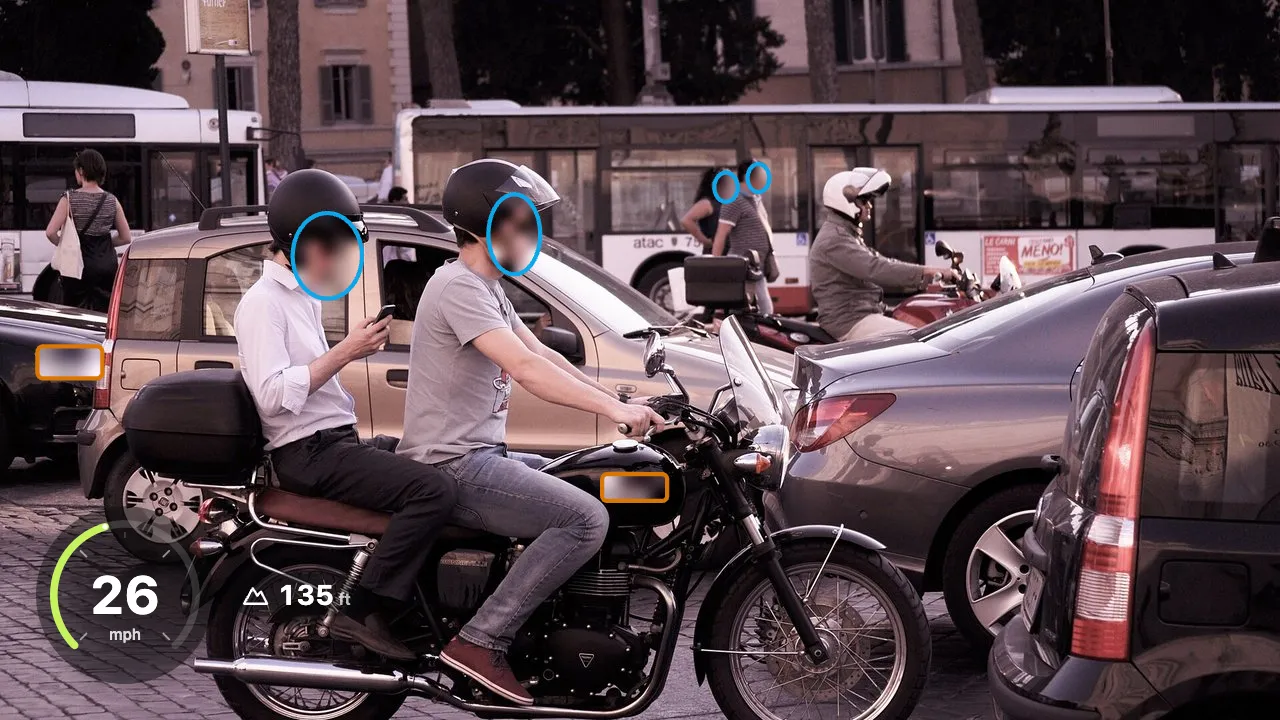
Join GoPro chapters, hide plates and passers-by, turn the wind down and draw a speed gauge from the camera’s GPS. Your ride footage stays on your own device from the first file to the finished MP4.
Drop your video here
Choose your videoMP4, MOV, WebM or MKV. It opens right here, on your device.
- Nothing uploaded
- No sign-up
- No watermark
How it works
Drop the ride
A single video, or every chapter file of a GoPro recording at once (GX01…, GX02…). Chapters are joined into one video without re-encoding.
Choose “A motovlog”
The recipe turns on wind and noise reduction, balanced loudness and the ride gauge, and starts gentle silence cutting and a thorough face and plate scan as the video opens.
Check and export
Reveal what may be seen, keep your home out of the video, set up the gauge and save a new MP4.
What you get
- GoPro chapters joined
- A long recording the camera split into several files becomes one video again, with no quality lost in the join.
- Plates and faces hidden
- A thorough scan starts as the video opens: other riders, drivers, pedestrians and number plates are found and followed. Everything found starts hidden.
- Less wind, clearer voice
- Noise reduction keeps your voice and pushes down wind and engine roar, and “Balance loudness” sets the loudness for social platforms.
- Speed gauge from GPS
- GoPro GPS becomes speed, altitude, estimated lean angle and g-force, as a dial or a minimal gauge. Your route is never drawn.
- Private places
- Save places like home on your device. Time near them is blurred or cut, and the gauge switches off there.
- Quiet stretches trimmed
- The recipe cuts gently: long gaps where nothing is said go. Every cut is listed and can be brought back.
When a motovlog needs editing
Daily commute clips
Same streets, same neighbours, same front door. Hide the plates and faces you pass and keep the start near home out of the video.
Weekend and group rides
Not everyone you ride with wants to be online. Reveal the friends who agreed with a tap, and the rest of the group stays hidden.
Touring and travel vlogs
Hours of footage over many GoPro chapters and wind on every word. Join the files, clean the sound, add the gauge and cut the dull parts.
A near miss on the road
Share a dangerous moment as a warning or with the right people. Keep the plate that matters visible and hide every uninvolved driver.
From helmet cam to finished motovlog, without uploading the ride
Ride footage is long and heavy. One afternoon on a helmet cam can fill several gigabytes, and many online tools ask you to upload the video first, which can take longer than the ride itself. Shycut is a motorcycle video editor that runs in your browser instead: your computer or phone reads the files, does the work and writes the new MP4. Nothing is uploaded, so the size of the ride only costs you time on your own device, never bandwidth or a waiting queue.
A camera on the road records everyone around you: drivers at the lights, people on the pavement, the plate of every car you follow. The motovlog recipe runs a thorough scan for faces and license plates as the video opens, and everything it finds is hidden, so nobody found is left visible by mistake. Tap a face or plate to reveal it. Helmets and visors make riders harder to find, so for anything missed, choose “Add area”, draw around it and it is followed as it moves.
Wind is the other classic motovlog problem. “Wind and noise reduction” uses a speech model that keeps your voice and pushes down wind, engine drone and hum. It is applied when you export, so the preview still sounds like the raw ride. “Balance loudness” then brings the whole video to the loudness social platforms play at. Music under the voice may sound thinner with noise reduction on, so check the exported file once before you post it.
If you ride with a GoPro that records GPS, there is more. Chapter files are joined back into one video, and the camera’s own GPS track becomes a speed gauge with ride stats. The route itself is never drawn. Places you save, like home or work, can be blurred or cut, and the exported file carries no GPS position, camera details or original timestamps. Long rides are fastest on a computer; a phone works too, it just needs more time.
Tips for a better motovlog
- A foam or fur wind cover on the microphone helps more than any software. Noise reduction works best when your voice is there to begin with.
- Noise reduction is applied on export, so listen to the exported file, not the preview, to judge the sound.
- Faces under helmets and visors are hard for any detector. Watch the preview once and use “Add area” for a rider the scan missed.
- On a GoPro, turn GPS on and wait for the GPS icon to settle before you press record, or the gauge has nothing to show at the start.
- Save home and work as private places once. They stay on your device and are hidden on every later ride too.
Private by construction
- Runs on your device
- Your browser decodes, analyses and encodes the video. There is no server to send it to.
- Nothing is uploaded
- The counter in the header measures every byte this page sends. It stays at zero.
- Location data wiped
- Phones hide GPS positions inside videos. The exported file never carries them.
Questions
Is this motovlog editor really free, with no upload?
Yes. Shycut runs in your browser, so joining, blurring, noise reduction and export all happen on your own device. There is no sign-up, no watermark and no server that ever receives your ride.
Which cameras does it support?
Any MP4, MOV, WebM or MKV can be blurred, cut and cleaned, whatever camera filmed it. The speed gauge, ride stats and private places need the GPS data that GoPro models with GPS record. Importing GPX files from other cameras is on our roadmap.
Can I hide where I live?
Yes. Pause where you pass your home and choose “Hide around here”. Time recorded near it is blurred or cut, on this ride and later ones. You can also hide where the ride starts and ends. Places are stored only on your device.
Why does the preview still sound windy?
Wind and noise reduction is applied when you export, not while you watch the preview. Export the video and listen to the new file to hear the cleaned sound.
Does it handle hour-long rides?
Yes. Nothing is uploaded, so the only limit is your device. Videos up to about an hour work well, and long rides are fastest on a computer.
Is my GPS route shared anywhere?
No. Coordinates are read on your device to draw the gauge and find your private places. They are never drawn on the video, and the exported file carries no location data at all.
Your video stays with you.
Open Shycut, drop the video in and export. Free, with no account, and your video never leaves your device.
Choose your videoMore free tools
- Blur faces in video
- Pixelate a face
- Blur a moving face
- Blur children’s faces
- Blur license plates
- Dashcam video editor
- Remove location data
- Video metadata viewer
- Check a video’s location
- Remove silences
- Add captions to video
- SRT subtitle generator
- Resize for Reels & TikTok
- Merge videos
- Merge portrait and landscape
- Add music to video
- Speed up video
- Screen recorder
- Merge GoPro videos
- GoPro speed overlay
- Remove wind noise