Remove location data from a video before you share it
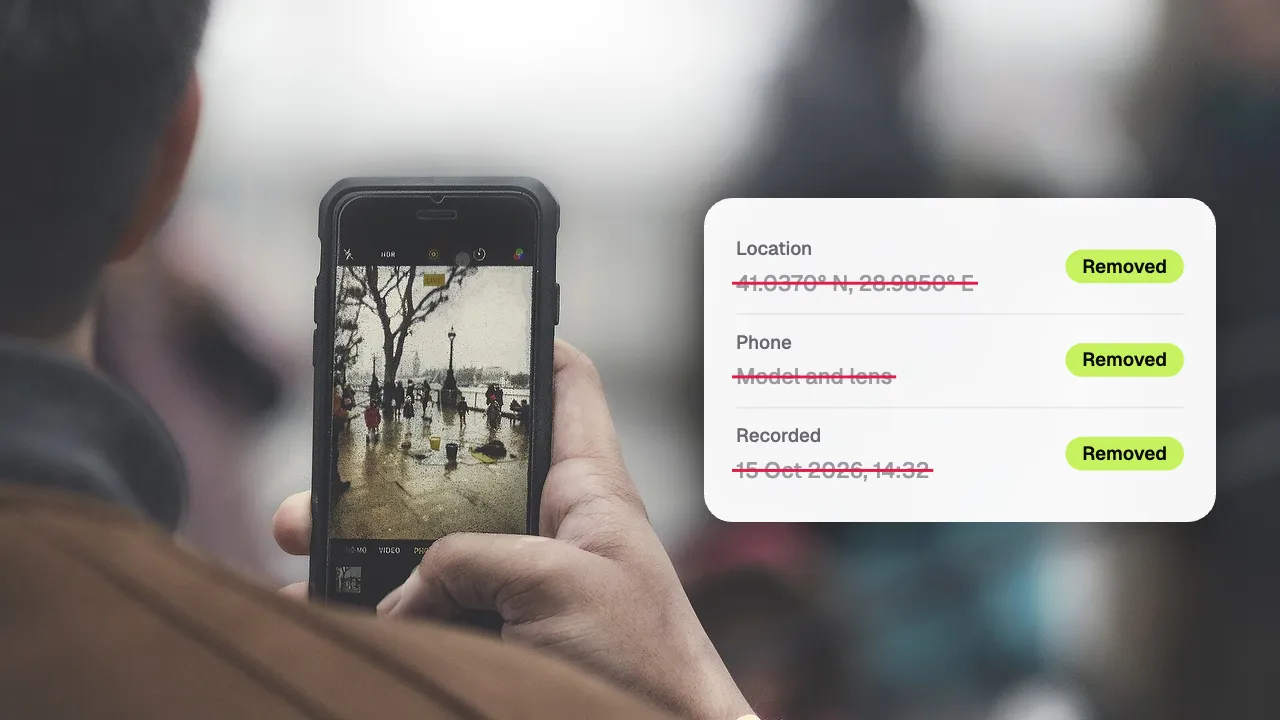
Phone videos quietly carry the GPS position where they were recorded, plus the phone’s model and the time it was shot. Every video Shycut exports leaves all of that behind, and the video is never uploaded to do it.
Drop your video here
Choose your videoMP4, MOV, WebM or MKV. It opens right here, on your device.
- Nothing uploaded
- No sign-up
- No watermark
How it works
Drop your video
Straight from your phone’s gallery or camera roll, in MP4, MOV, WebM or MKV. It opens in your browser.
Hide people, or nothing at all
The video opens as it is: nothing is scanned or changed. For the metadata alone, go straight to export; to hide faces or plates too, tap “Search” in the Privacy tab.
Export a clean copy
The new MP4 has no GPS position, no phone model and no original timestamps. Your original file is not touched.
What you get
- GPS position removed
- The location your phone or camera wrote into the file is not carried into the export.
- Phone model and times removed
- The device’s model and the original recording timestamps stay behind too.
- Faces and plates as well
- The same export can hide the people and vehicles that could identify a place.
- Several videos at once
- Drop a batch of files and process them one by one: each is exported with the same recipe, metadata left behind.
- Private places for rides
- With GoPro GPS, time near places you save, like home, can be blurred or cut out of the video itself.
- Never uploaded
- A tool that removes your location should not need to see your video. This one runs on your device.
When to remove location from a video
Selling something online
A video of the item you are selling, filmed at home, can carry your home’s position. Send buyers a clean copy.
Sending the file itself
Videos shared as files, documents, cloud links or e-mail attachments often keep everything the phone wrote. Clean them first.
Walk-throughs and reports
A clip for a landlord, a seller or an online forum should show the problem, not where you live or which phone you own.
Ride and travel footage
GoPro clips with GPS carry the whole route inside the file. The export leaves it out, and private places can hide home on screen too.
What a video file says about you, and how Shycut removes it
Besides the picture and the sound, a video file carries metadata: small notes the camera writes for itself. On most phones that includes the GPS position where the video was filmed (when the camera app may use location), the model of the phone, and the date and time it was shot. You never see these notes while watching, but anyone who receives the original file can read them, often just by opening the file’s details.
One position on its own may seem harmless. But a video filmed in your living room points to your home, a clip from the school run points to a school, and the timestamps show when you are usually there. Many large social networks strip this data when you post, yet a file sent as a document, a cloud link or an e-mail attachment usually keeps all of it. Removing the metadata yourself means you don’t have to know what each app does with it.
Shycut doesn’t edit the old file in place. It reads the video in your browser, decodes the frames and writes a brand-new MP4 with H.264 video and AAC sound. The original metadata is simply not copied across: no GPS location, no phone model, no original timestamps. Because nothing is uploaded, the location you want to hide is never sent to a server on its way to being removed. The original stays in your gallery exactly as it was, so keep it private once you have the clean copy.
Metadata is only half the story. The picture itself can give a place away: a street sign, a house number, the view from a window, a car’s plate. The same export can hide faces and plates, and “Add area” lets you cover a sign or a house number and follows it as the camera moves. For GoPro rides, private places go further: you save spots like home on your device, and the time near them is blurred or cut, with the start and end of the ride hidden if you like. Not sure what your file gives away? Check the video’s location first, or read everything it carries in the video metadata viewer.
Tips for sharing without a location
- Not sure whether a video has a location? Drop it on Shycut’s video metadata viewer: it says whether the file holds a place, without uploading it.
- To stop new videos carrying a location at all, turn off location access for the camera app in your phone’s settings.
- When you only want the metadata gone, choose “High” quality and “Original” resolution for the closest match to what you filmed.
- Give the exported file a neutral name if the original name says something about the place or the date.
- Look at the background as well: signs, house numbers and the view from a window can give a place away without any GPS.
Private by construction
- Runs on your device
- Your browser decodes, analyses and encodes the video. There is no server to send it to.
- Nothing is uploaded
- The counter in the header measures every byte this page sends. It stays at zero.
- Location data wiped
- Phones hide GPS positions inside videos. The exported file never carries them.
Questions
Do my videos contain my location?
Often, yes. When the camera app may use location, most phones write the GPS position into the video file. Anyone who receives the original file can read it.
What exactly is removed?
The GPS position, the phone model and the original recording timestamps. The source file’s metadata is not copied into the export at all; only the picture and sound you edited are written into the new MP4.
Don’t social networks remove it anyway?
Many large platforms strip it when you post, but files sent as documents, cloud links or e-mail attachments usually keep it. Removing it yourself means you don’t have to rely on anyone.
Does removing the metadata lower the quality?
Shycut writes a new MP4 rather than copying the old one, so the video is encoded again at the quality you choose. Pick “High” and “Original” resolution for the closest match to the original.
Is my video uploaded to clean it?
No. Everything happens in your browser on your own device, and nothing is sent anywhere. The counter in the app’s header measures every byte the page sends, and it stays at zero.
Does it remove the GPS data from GoPro videos too?
Yes. A GoPro with GPS stores its position track inside the file, and the exported MP4 leaves it out. You can still show speed or altitude as a gauge; the route and coordinates are never drawn on the video.
Your video stays with you.
Open Shycut, drop the video in and export. Free, with no account, and your video never leaves your device.
Choose your videoMore free tools
- Blur faces in video
- Pixelate a face
- Blur a moving face
- Blur children’s faces
- Blur license plates
- Dashcam video editor
- Video metadata viewer
- Check a video’s location
- Remove silences
- Add captions to video
- SRT subtitle generator
- Resize for Reels & TikTok
- Merge videos
- Merge portrait and landscape
- Add music to video
- Speed up video
- Screen recorder
- Motovlog editor
- Merge GoPro videos
- GoPro speed overlay
- Remove wind noise