Add text above a video, meme style
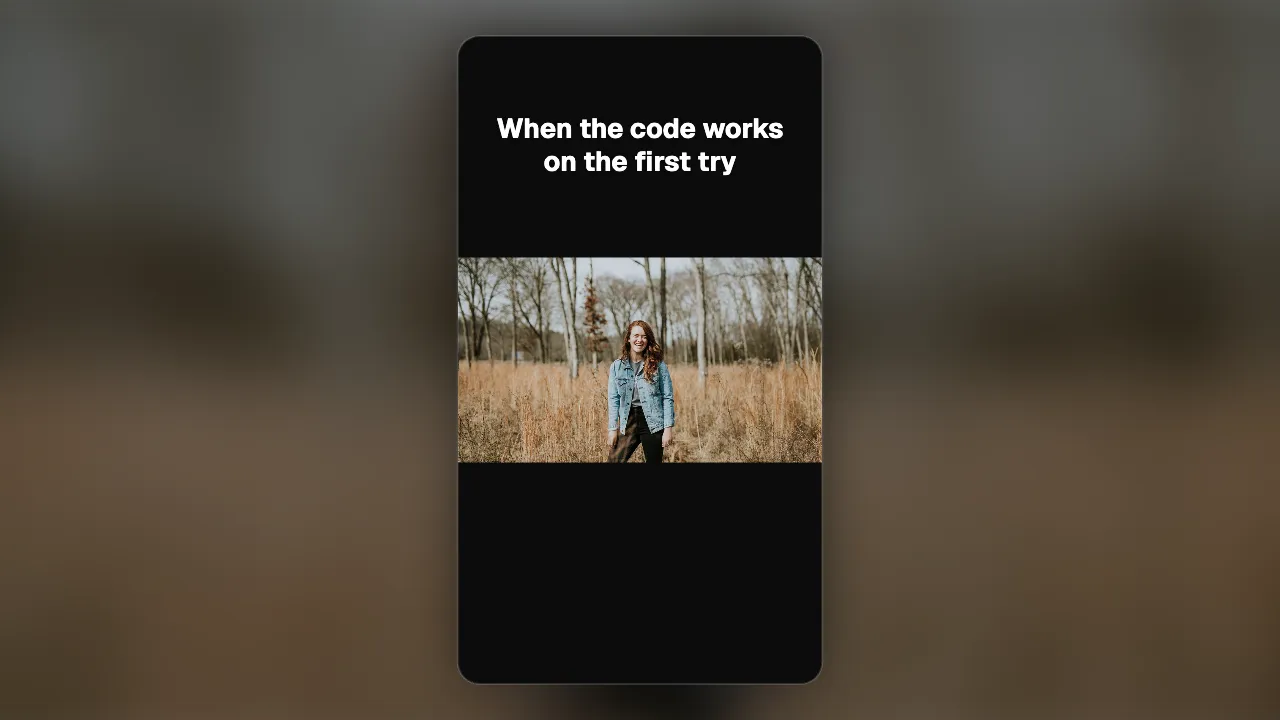
The meme format in one tap: your clip sits in a 9:16 frame for Reels and TikTok, the space above and below it turns a plain colour, and your words wait in the top band, ready to be typed over. Change the band to white or any colour, the words to one of four looks, and save an MP4 or a GIF. Free, in your browser, with nothing uploaded.
Drop your video here
Choose your videoMP4, MOV, WebM or MKV. It opens right here, on your device.
- Nothing uploaded
- No sign-up
- No watermark
How it works
Drop your video
It opens in a 9:16 frame with black bands above and below it, and “Your text” in the top band.
Type your words
Type over “Your text”. Pick a look, a font and a colour; drag the words anywhere if the band isn’t the place.
Save
Export an MP4 for Reels, TikTok and Shorts, or a GIF for chats, with the words drawn in.
What you get
- The frame is set up for you
- A tall frame, the clip in the middle, plain bands above and below it and the words in the top one, for the whole video.
- Any band colour
- Black, white, a colour picked from your video or anywhere on screen with the eyedropper, or a soft blur.
- Four looks for the words
- Plain with a soft shadow, outlined, on a dark band or on a coloured tag, in Sans, Serif or Mono, bold or not.
- Words anywhere, any time
- Drag the words over the video itself, resize them by the corner, and shorten them on the timeline to show them for a moment.
- Other shapes too
- Prefer a square or a 4:5 post? Pick the shape; the bands shrink and the words keep their place.
- Nothing uploaded
- Your browser makes the video on your device. No sign-up, no account and no watermark.
What people put above a video
The classic meme
“Me when the Wi-Fi drops for three seconds:” above the clip that says the rest.
A reaction with context
What happened before the clip, in one line above it, so it lands without sound.
A question to the viewer
“Would you try this?” above a recipe, a trick or a product, to start the comments.
A title for a wide clip
A landscape clip posted as a Reel, with its title in the band instead of a black gap.
How the meme format works, and how to make it look right
A wide clip in a tall frame leaves room above and below it. For a 16:9 clip, the bands take about 68 % of a 9:16 frame, 44 % of a square and 55 % of a 4:5 post, split evenly top and bottom. The meme format turns that empty space into the place for words: the band is a plain colour, the words sit on it, and nothing covers the clip. On a phone feed, the line above the video is read first, which is why the format works with the sound off.
Shycut sets it up when you open a video from this page: a 9:16 frame at 1080p, the clip centred, both bands black and “Your text” in the middle of the top band, shown from the first frame to the last. The bands are made by the same tool that removes text from a video: everything around the clip is emptied to a colour you choose in the Size tab, so the words are never drawn over a blurred copy of the clip unless you choose a blur.
The words are a text layer: up to 280 characters on up to eight lines, set in Sans, Serif or Mono, bold or regular, in one of six colours and four looks. White words on black, or black words on white, read best; on a coloured band choose the outlined look. Keep it to one or two lines that fit the band: a line grows as you type until it reaches the frame’s width, and then its letters shrink to fit. Words can go anywhere: drag them over the clip, resize them from the corner, and on the timeline make them appear for only part of the video.
To put words over the video rather than above it, without bands, add text in any edit with the T key or the text button in the Media tab; the same looks and fonts apply. For speech written out word by word, add captions instead: they are timed to what is said and can be burned in under the band. Everything happens in your browser, and the video is never uploaded.
Tips for a meme that reads well
- Write the line as the viewer’s thought, and leave the punchline to the clip.
- One or two lines: a third line makes the letters too small to read on a phone.
- White band, black words for the classic look; black band, white words for a cleaner one.
- Put the most important word first: feeds crop previews from the top.
- Save a GIF too for chats: GIFs are kept to the first minute of the video.
Private by construction
- Runs on your device
- Your browser opens, edits and saves the video. There is no server to send it to.
- Nothing is uploaded
- The counter in Shycut’s header measures every byte the app sends while you work. It stays at zero.
- Location data wiped
- Phones hide GPS positions inside videos. The file you save never carries them.
Questions
Is this meme video maker free, without a watermark?
Yes. Shycut is free, with no sign-up, no watermark and no paid plan, and it runs in your browser on a phone or a computer.
How do I make the band white instead of black?
Open the Size tab: under “Fill the rest with”, choose “A colour” and tap white, or pick any colour from the screen with the eyedropper. Then make the words black in their settings.
Can I put text over the video instead of above it?
Yes. Drag the words onto the clip, or start in the plain editor and press T to add words anywhere on the video, in the same four looks.
Does it have the classic meme font?
Shycut has three fonts, Sans, Serif and Mono, with bold. The bold Sans on a plain band gives the familiar meme look; there is no Impact font.
Can I keep the video square instead of vertical?
Yes. Pick 1:1 or 4:5 in the Size tab: the bands get smaller, and the words stay in the top one.
Is my video uploaded?
No. The frame, the bands and the words are all made by your browser on your device, and the counter at the top of the page stays at 0 B for your video.
Your video stays with you.
Open Shycut, drop the video in and export. Free, with no account, and your video never leaves your device.
Choose your videoMore free tools
- Blur faces in video
- Pixelate a face
- Blur a moving face
- Blur children’s faces
- Blur license plates
- Dashcam video editor
- Remove location data
- Video metadata viewer
- Check a video’s location
- Remove silences
- Video voice changer
- Bleep out words in a video
- Add captions to video
- SRT subtitle generator
- Audio to text
- Resize for Reels & TikTok
- Crop a video
- Remove text from video
- Zoom in on a video
- Merge videos
- Merge portrait and landscape
- Add music to video
- Speed up video
- Screen recorder
- Podcast recorder
- Online voice recorder
- Mic test
- Audio editor
- Merge audio files
- Remove background noise
- Add a voice-over
- Audiogram maker
- Motovlog editor
- Merge GoPro videos
- GoPro speed overlay
- Remove wind noise